Devices & smart home
VoltraX works with one smart device: the MTTL-W01 Wi-Fi smart power strip. Here is what it does, what VoltraX adds, and how it works with Alexa and Home Assistant.
The MTTL-W01 Wi-Fi smart power strip
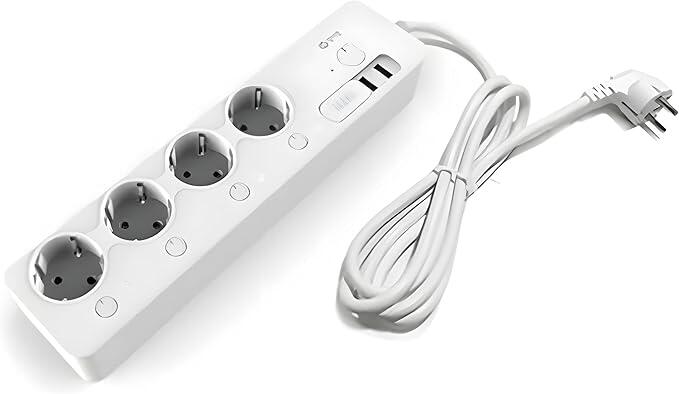
The MTTL-W01 is a Wi-Fi smart power strip with four outlets, each with its own button. In Egypt it is known as the Korean multi-tap (المشترك الكوري); it was sold as the LG U+ smart multi-tap. VoltraX turns each of its outlets into a smart device you control from your phone, the web, your voice assistant or Home Assistant.
Specifications
- Model
- MTTL-W01
- Outlets
- 4, each switched on its own
- Buttons
- One per outlet on the strip; each can be locked (child lock)
- Metering
- Power (W) and energy (kWh) per outlet; voltage, current and temperature of the strip
- Wi-Fi
- 2.4 GHz, WPA2-Personal or open
- Protection
- Temperature, total current and total power limits (up to 90 °C, 16 A and 3000 W)
What the strip can do
All of this runs on the strip itself, on your home Wi-Fi, even without internet.
Each outlet, at home
The owner’s phone switches each outlet, or all four at once, directly over your home Wi-Fi, encrypted, with no internet needed.
The buttons on the strip
Each outlet’s own button always switches it, with or without the app.
Restart an outlet
Turn an outlet off and back on after 1 to 300 seconds, for a router or a receiver that needs a fresh start.
Schedules on the strip
Up to 8 schedules stored on the strip itself: every day, on chosen weekdays, on a day of the month or on its last day. They run even with no internet.
Auto-off timer
Switch an outlet off after 1 to 1440 minutes. One timer per outlet, run by the strip.
Live readings
Power per outlet, voltage, current and temperature, and the energy used since the last reset, read straight from the strip.
Protection limits
Temperature, total current and total power limits (up to 90 °C, 16 A and 3000 W). When one is crossed the strip switches every outlet off by itself.
After a power cut
Choose per outlet: off, on or as it was, with a delay of up to 12 hours and a gap between outlets so devices don’t all start at once.
What VoltraX adds
VoltraX doesn’t make the strip. We make the software that turns it into a smart home device:
VoltraX firmware
New software for the strip, installed over Wi-Fi by the VoltraX app during setup, in place of the original firmware. The owner can return to the original firmware from the strip’s settings in the app.
The VoltraX app
For Android on Google Play, and for iPhone on the App Store. Set up the strip, name and switch its outlets, and manage schedules, protection and energy. At home it talks to the strip directly over your Wi-Fi, encrypted.
Web panel
Your strips, live, in any browser: outlets, readings, schedules, energy and automations.
VoltraX Cloud
Control from anywhere, family sharing, cloud automations, energy history, notifications and Alexa.
VoltraX Cloud is optional. At home, even without internet, the owner’s phone, the strip’s own schedules, timers and protection, its buttons and Home Assistant keep working. Internet is needed to sign in and to add the strip the first time.
Amazon Alexa
Link VoltraX with Alexa: in the VoltraX app tap Link with Alexa, or in the Alexa app: Skills → VoltraX → Enable. Each outlet becomes an Alexa device, for example “Alexa, turn on the heater”, in English or Arabic. It needs VoltraX Cloud on the strip: included in the 5-day free trial and in Pro, not in Basic.
Home Assistant
Home Assistant connects to the strip directly on your home network with its own key: a switch, power and energy sensors per outlet. No internet and no cloud, on every plan.
How to set up Home AssistantDo I need to buy anything?
No. VoltraX doesn’t sell hardware: it works with the MTTL-W01 strip you already have. Install the VoltraX app on an Android phone, and it moves the strip to the VoltraX firmware during setup; after that the iPhone app works too. Every new account starts with a 5-day free trial of everything; then choose Basic or Pro.
What you need
An MTTL-W01 strip
The MTTL-W01 smart power strip (المشترك الكوري). One with the original LG firmware is moved to VoltraX by the app during setup.
2.4 GHz home Wi-Fi
The strip joins 2.4 GHz Wi-Fi with WPA2 or no password. A network that is only 5 GHz will not work.
A phone
For a strip with its original firmware: an Android phone (7.0 or newer) with the VoltraX app, near the strip, for the first setup. After that, an iPhone (iOS 17 or newer) works too.
Internet, once
To sign in and to add the strip the first time. After that your home Wi-Fi is enough.
A VoltraX account
Continue with Google, or sign in with a phone account from VoltraX support.
Questions?
Ask us anything about your strip, Alexa or Home Assistant: e-mail us or use the contact page.